


Pipeline
The Pipeline tracks your sales opportunities from initial discovery through closed deals. Manage deal stages, probabilities, and expected close dates to forecast revenue and monitor your sales funnel. This gives you visibility into potential revenue before it hits your books.
Accessing the Pipeline
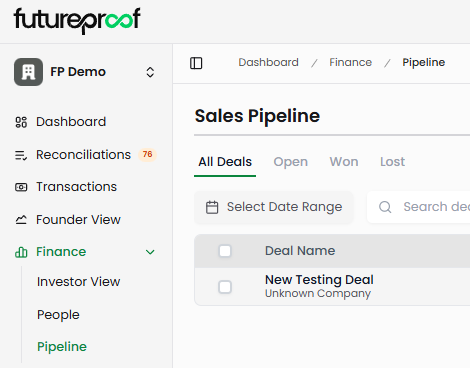
Navigate to Finance in the left sidebar, then select Pipeline from the submenu. The page displays all active deals organized by stage in a table view.
Page Layout
Pipeline Tabs
Four tabs at the top filter deals by status: All Deals shows every opportunity regardless of stage. Open displays active deals still in progress. Won shows successfully closed deals. Lost filters to deals that didn't close.
Why it matters: Quick status filtering helps you focus on active opportunities when managing your sales process, review win rates when analyzing performance, or identify patterns in lost deals to improve your approach.
Deal Table
The main table displays your pipeline with sortable columns. Each row represents one sales opportunity with key details at a glance.
Deal Name shows the opportunity title (e.g., "New Testing Deal"). Click any deal name to open the detail modal with complete information.
Value displays the potential deal amount. Sort this column to prioritize your largest opportunities or identify small deals that might close quickly.
Deal Type indicates whether this is New Business (new customer acquisition) or Existing Business (expansion, upsell, or renewal from current customers).
Stage shows where the deal sits in your sales process. Deals progress through Discovery, Qualified to Buy, Proposal, Negotiation, Verbal Agreement, and finally Closed Won or Closed Lost.
Probability displays your estimated likelihood of closing (e.g., "80%"). Higher probabilities indicate deals closer to closing or with stronger commitment signals.
Owner identifies who's responsible for managing the deal. This appears as an email address (e.g., "oz+demo@runfutureproof.com").
Close Date shows the expected closing date. Sort by this column to see which deals should close soonest and prioritize your follow-up activities.
Last Activity displays the most recent update date for the deal (e.g., "09/02/2025").
Why it matters: The table view provides your complete pipeline at a glance. Sort by close date to focus on imminent opportunities, by value to prioritize high-impact deals, or by probability to identify deals needing attention before they stall.
Toolbar Actions
Select Date Range: Click the date picker to filter deals by time period. Choose from preset options like Current Month, Last 2 Weeks, or custom date ranges to focus on specific timeframes.
Search deals: Type in the search box to find specific opportunities by deal name. This quickly locates deals when you have dozens or hundreds in your pipeline.
Filter: Click the filter icon to access advanced filtering by Stage, Owner, or Company. Combine filters to create precise views like "all Proposal stage deals owned by a specific team member" or "all opportunities with a specific company."
Export: Download your current pipeline view to CSV or XLS format. The export respects active filters and date ranges, creating targeted reports without exporting your entire pipeline history.
Column customization: Control which columns appear in your table view. Hide columns you don't need for your current task to reduce visual clutter.
Add deal: Click the green "+" button to create new sales opportunities.
Deal Stages Explained
Your pipeline uses seven predefined stages that deals progress through:
Discovery: Initial qualification and needs assessment. You're determining if there's a potential fit and gathering information about the prospect's requirements.
Qualified to Buy: The prospect has confirmed budget, authority, need, and timeline. They're a legitimate opportunity worth pursuing.
Proposal: You've submitted a formal proposal or quote. The prospect is reviewing your offering and pricing.
Negotiation: Active discussions about terms, pricing, or contract details. Both parties are working toward agreement.
Verbal Agreement: The prospect has verbally committed to moving forward. You're waiting on signed contracts or formal approval.
Closed Won: Deal successfully closed. Revenue will be recognized and the customer moves into onboarding.
Closed Lost: Deal did not close. The prospect chose a competitor, delayed indefinitely, or determined they don't need the solution.
Why it matters: Consistent stage definitions create predictable pipeline management. Everyone on your team uses the same criteria to assess deal progress, making pipeline reviews and forecasts more accurate. Stages also help you identify where deals typically stall so you can improve your sales process.
Filtering Deals
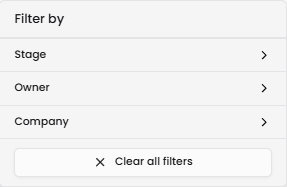
Click the filter icon to open advanced filtering options. Three filter types help you narrow your pipeline view:
Stage: Filter to deals in specific pipeline stages. Select multiple stages to see related groups like all active stages (Discovery through Verbal Agreement) or all closed stages (Closed Won and Closed Lost). Click "Clear all filters" at the bottom to reset.
Owner: Filter to deals owned by specific team members. This helps managers review individual pipelines or helps salespeople focus on their own opportunities.
Company: Filter to deals with specific companies. This shows all opportunities with a given prospect, useful when multiple deals are in progress with the same organization.
Why it matters: Effective filtering helps you analyze your pipeline from different angles. Filter by stage to understand pipeline composition, by owner to review team member performance, or by company to see all opportunities with strategic accounts.
Creating New Deals
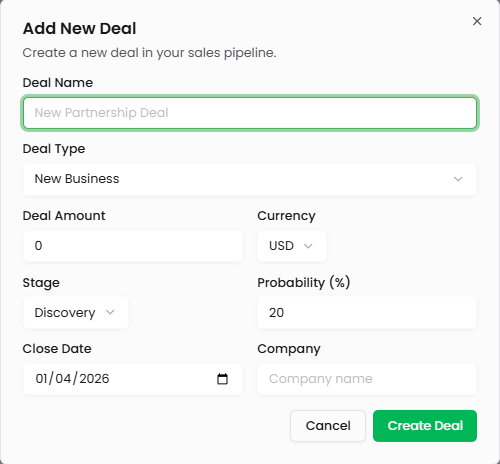
Click the green "+" button in the top right to open the Add New Deal modal. The form includes several required and optional fields:
Deal Name: Enter a descriptive name for the opportunity (e.g., "Acme Corp - Enterprise Plan"). Use naming conventions that make deals easy to identify in your pipeline list.
Deal Type: Select either New Business for new customer acquisition or Existing Business for expansion, upsell, or renewal opportunities with current customers.
Deal Amount: Enter the total contract value. For recurring revenue, enter the annual contract value (ACV) rather than lifetime value. The currency defaults to USD.
Currency: Currently defaults to USD. This field appears for future multi-currency support.
Stage: Select the current pipeline stage. New deals typically start in Discovery or Qualified to Buy depending on your qualification process.
Probability (%): Enter your estimated likelihood of closing this deal. Use consistent criteria across deals—for example, Discovery might be 10%, Qualified to Buy 25%, Proposal 50%, Negotiation 75%, and Verbal Agreement 90%.
Close Date: Select the expected closing date using the date picker. This drives pipeline forecasting and helps you prioritize follow-up activities.
Company: Enter the company name manually. This field accepts text input rather than selecting from a predefined list.
Click Create Deal to add the opportunity to your pipeline. Click Cancel to discard without saving.
Why it matters: Accurate deal entry ensures reliable pipeline forecasting. Consistent probability assessments across deals create weighted pipeline values that predict likely revenue. Expected close dates help you plan cash flow and identify deals that need acceleration.
Viewing Deal Details
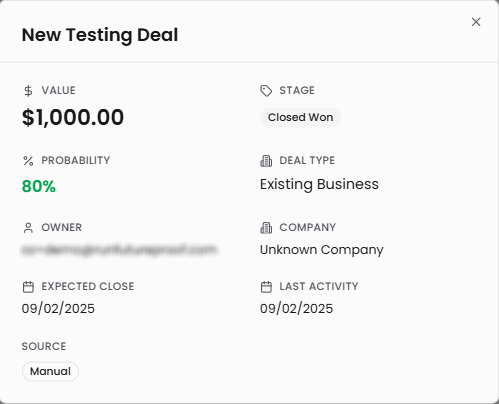
Click any deal name in the pipeline table to open the deal detail modal. This view shows complete opportunity information:
Value: The total deal amount displayed prominently at the top (e.g., "$1,000.00").
Stage: Current pipeline stage (e.g., "Closed Won").
Probability: Your estimated likelihood of closing (e.g., "80%").
Deal Type: Whether this is New Business or Existing Business.
Owner: Who's responsible for managing this opportunity.
Expected Close: The target closing date.
Last Activity: When the deal was last updated.
Source: How the deal was created. Currently shows "Manual" for all deals entered through the interface.
Why it matters: The detail view provides complete context when reviewing opportunities during pipeline calls, preparing for prospect meetings, or analyzing why deals won or lost. Having all information in one place eliminates the need to track deal details in separate spreadsheets or notes.
Editing and Managing Deals
Click any deal to open the detail modal, then edit any field to update the opportunity. Change the stage as deals progress through your sales process, update the probability when commitment signals strengthen or weaken, or adjust the close date when timelines shift.
Close won deals by changing the stage to Closed Won when contracts are signed. Close lost deals by selecting Closed Lost when opportunities don't convert.
Delete deals by clicking the three-dot menu and selecting Delete. Use this for duplicate entries or deals created in error. Deleted deals cannot be recovered.
Why it matters: Keeping deal information current ensures accurate pipeline forecasting and helps you identify opportunities needing attention. Updating stages promptly prevents pipeline reviews from showing outdated information. Closing deals appropriately (won vs. lost) enables win rate analysis and pattern identification.
Deal Types: New Business vs. Existing Business
When creating or editing deals, you select between two deal types:
New Business represents revenue from new customer acquisition. These deals involve prospects who aren't current customers. New business typically has longer sales cycles, higher acquisition costs, and requires more initial qualification.
Existing Business represents revenue from current customers—expansions, upsells, cross-sells, or renewals. These deals leverage existing relationships and often close faster with higher win rates than new business.
Why it matters: Separating new from existing business helps you understand your revenue composition. Heavy reliance on new business indicates strong customer acquisition but potential retention challenges. Strong existing business suggests good customer success and expansion opportunities. This split also helps you allocate sales and marketing resources appropriately between acquisition and expansion motions.
Pipeline Management Best Practices
Update deals regularly: Review and update your pipeline weekly at minimum. Change stages as deals progress, adjust probabilities when circumstances change, and update close dates when timelines shift. Stale pipeline data produces inaccurate forecasts.
Use consistent probability criteria: Establish clear guidelines for probability percentages at each stage. For example, Discovery might always be 10-20%, while Verbal Agreement might be 85-95%. Consistency across deals creates reliable weighted forecasts.
Move deals promptly: Don't leave deals in the wrong stage. If a prospect ghosts after receiving your proposal, move them to Closed Lost rather than leaving them in Proposal stage indefinitely. Honest stage assessment produces accurate pipeline metrics.
Set realistic close dates: Use conservative close date estimates rather than optimistic ones. It's better to forecast $50K closing next quarter and have it come in early than forecast it this quarter and miss your target.
Close deals definitively: Mark deals as Closed Won or Closed Lost rather than leaving them in late stages forever. This prevents pipeline bloat and enables accurate win rate analysis.
Review lost deals: Periodically filter to Closed Lost deals and analyze patterns. If you're losing consistently at the Proposal stage, your pricing might be off. If deals stall in Negotiation, your contract terms might need adjustment.
Track new vs. existing mix: Monitor the ratio of New Business to Existing Business deals. Healthy SaaS companies often derive 30-50% of new revenue from existing customer expansion. If all your pipeline is new business, you may have retention or expansion challenges.
Use the export function: Create weekly or monthly pipeline snapshots by exporting to Excel. Track how pipeline composition changes over time, measure stage velocity (how long deals spend in each stage), and identify trends in deal sizes or close rates.
Align close dates with cash planning: Coordinate your pipeline close dates with cash flow forecasting in Founder's View. If runway is tight and you need revenue in Q2, filter your pipeline to deals closing that quarter and assess whether those probabilities are realistic.
Pipeline Analysis Strategies
Weighted pipeline value: Multiply each deal's value by its probability to calculate weighted value. A $100K deal at 50% probability contributes $50K to weighted pipeline. Sum weighted values across all deals to estimate likely revenue.
Stage distribution: Review how many deals sit in each stage. Healthy pipelines typically show more deals in early stages (Discovery, Qualified) than late stages (Negotiation, Verbal Agreement). Too many deals in late stages might indicate optimistic staging or slow sales cycles.
Close date clustering: Filter by date ranges to see when deals are expected to close. If all your deals close next quarter with nothing following, you need more early-stage activity to maintain pipeline flow.
Win rate analysis: Calculate the percentage of deals that reach Closed Won vs. Closed Lost. Track this by deal type—new business often has lower win rates than existing business. Improving win rates is often more impactful than increasing pipeline volume.
Time in stage: While the system doesn't automatically calculate this, track how long deals typically spend in each stage. Deals that sit in Proposal for months likely need intervention. Average stage duration helps predict when deals will actually close.
Relationship to Other Futureproof Features
Revenue Dashboard: Closed Won deals should align with revenue appearing in your Revenue Dashboard. If you close a $50K annual contract, expect to see monthly recurring revenue increase accordingly.
Founder's View: Use pipeline close dates to inform revenue projections in scenario planning. Your weighted pipeline value helps determine realistic revenue growth assumptions for forecasting.
SaaS Dashboard: For subscription deals, Closed Won deals should correspond to ARR increases. New Business deals add new ARR, while Existing Business deals contribute to expansion ARR.
Transactions: When deals close and payment is received, those transactions appear in your Transactions ledger. The deal name might appear as the transaction description or vendor name.
Why it matters: Pipeline doesn't operate in isolation—it's the leading indicator for revenue that will eventually flow through your other dashboards. Accurate pipeline management helps you predict cash flow needs, plan hiring timing, and make confident commitments to investors about growth trajectory.
Tips for Effective Pipeline Management
Name deals descriptively: Use company names and deal specifics in deal names. "Acme Corp - Enterprise Plan" is better than "Big Deal" or "Q2 Opportunity." Good naming makes pipeline reviews efficient.
Start with conservative probabilities: It's better to be pleasantly surprised when deals close than consistently miss forecasts. If you're uncertain, round probability down rather than up.
Update close dates when they slip: Don't leave deals with past close dates in your pipeline. When dates pass, either close the deal as lost or update to a new realistic date. Overdue deals clutter pipeline reports.
Use filters during pipeline reviews: When reviewing pipelines with your team, filter to specific owners so each person sees only their deals. This focuses discussion and prevents information overload.
Export before board meetings: Create a pipeline snapshot the week before board meetings. This gives you point-in-time data to discuss, and you can compare to previous exports to show pipeline growth or contraction.
Document deal context elsewhere: Since the pipeline doesn't support notes or attachments, maintain deal context in your CRM, email, or project management tools. The pipeline tracks high-level status and metrics, not detailed conversation history.
Set close date reminders: Add calendar reminders for important close dates. When deals approach their expected close date, reach out proactively rather than waiting for the prospect to contact you.
Review the full pipeline monthly: Beyond weekly updates, do a comprehensive monthly pipeline review. Look for deals that haven't moved stages in 30+ days, reassess probabilities for all opportunities, and close lost deals that have gone dark.
Common Pipeline Scenarios
Building initial pipeline: When starting with an empty pipeline, add all active opportunities regardless of stage. Better to have an honest view of current deals (even if some are long shots) than an artificially clean but incomplete pipeline.
Preparing for fundraising: Export your pipeline to show investors your sales momentum. Include both New Business and Existing Business deals to demonstrate acquisition capability and expansion potential. Conservative probability weighting shows you're realistic about conversion rates.
Sales capacity planning: Use pipeline velocity (how quickly deals move through stages) and current pipeline volume to determine if you need additional sales capacity. If deals are piling up in Discovery because you can't follow up quickly enough, you may need to hire.
Revenue forecasting: Filter to deals closing in specific quarters, calculate weighted pipeline value, and use that to inform revenue projections in Founder's View. If weighted Q2 pipeline is $200K, you might forecast $150-175K actual revenue accounting for some slippage.
Identifying bottlenecks: If deals consistently stall at a specific stage, investigate why. Lots of deals stuck in Proposal might indicate pricing issues. Deals stuck in Negotiation might mean contract terms need simplification.